

Table of Contents
ToggleStop Guessing. Start Outranking.
As an SEO specialist with over 10 years of experience, I’ve seen countless businesses struggle to organize SEO competitor data. They have the exports from Ahrefs or Semrush, but they don’t have a strategy.
I built the Universal SEO Intelligence Engine to solve that. This isn’t just a spreadsheet; it’s an automated workflow that identifies your “Golden Keywords” in seconds.
How to Get Started (3-Step Setup)
Step 1: Get Your Private Copy
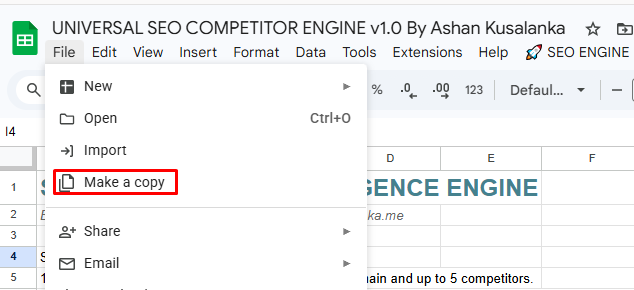
Click the button below to open the Master Template. Go to File > Make a copy to save your private, secure version.
Step 2: Configuration & First-Time Authorization
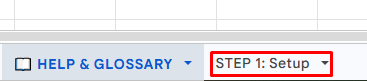
Open your copy, navigate to the STEP 1: Setup tab, and enter your domain and competitors.
When you run the script for the first time, Google will ask for permission.
Don’t worry about the “Google hasn’t verified this app” warning. This is a standard security measure for custom power-tools built for the community. Since the script runs entirely within your Google account, I never see your data. It’s 100% private.
Follow these 3 clicks to authorize:
Click “Advanced” on the bottom left of the “App hasn’t been verified” popup.
Click “Go to SEO ENGINE (unsafe)” (It is safe—it’s just Google’s way of saying it’s a custom script).
Click “Allow” on the final screen.
Step 3: Import & Analyze
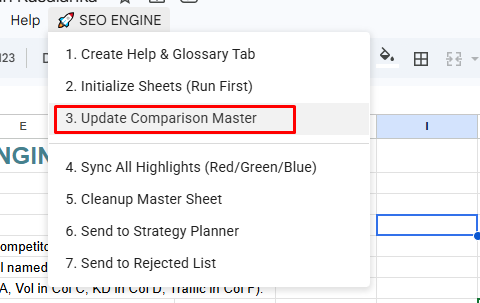
Paste your SEO tool exports into the competitor tabs. Click Update Comparison Master, and watch the engine build your market map.
Help & Glossary
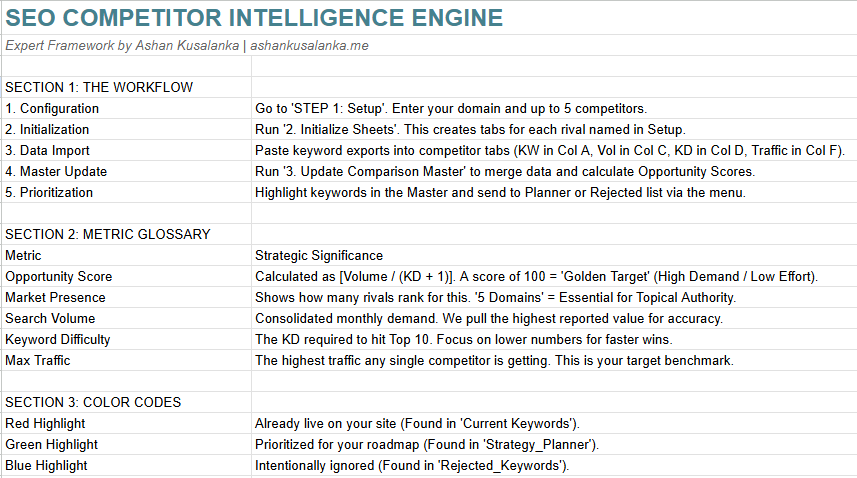
What This Tool Does For You
Consolidates 5 Competitors: Automatically merges data from up to 5 rivals into one “Clean-View” Master sheet.
The Opportunity Score: Uses a custom algorithm
[Volume / (KD + 1)]to rank keywords from 0-100.Market Presence Tracking: Instantly highlights “Must-Have” keywords where every competitor is already ranking.
Decision Workflow: One-click buttons to send keywords to your Strategy Planner or Rejected List.
The Metric Glossary
| Metric | Strategic Significance |
|---|---|
Opportunity Score |
Identifies “Low-Hanging Fruit.” High volume with low effort. |
Market Presence |
If “5 Domains” is highlighted in Gold, you are the only player missing out on that traffic. |
Max Traffic |
Shows the highest traffic any competitor earns for that term—your target benchmark. |
Expert Tips
Prioritize the Gold: If 5 domains are ranking for a term you don’t have, make that your next Pillar Page.
The “Rejected” Logic: Don’t just delete bad keywords. Move them to the Rejected List so you (and your team) know exactly why you chose not to target them.
Need Help Scaling Your SEO?
If you’ve analyzed your competitors but need an expert to execute the strategy,
Let’s TalkThe 7-Step SEO Strategy Workflow (Summary)
Create the Workspace: Run 1. Create Help & Glossary Tab from the menu. This generates an internal guide so your team always knows exactly what the metrics mean.
Define Your Rivals: Go to the STEP 1: Setup tab. Enter your own domain and your top 5 competitors.
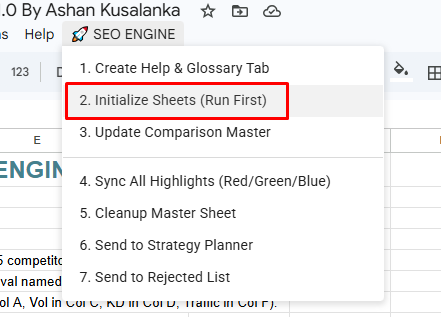
Initialize Your Sheets: Run 2. Initialize Sheets. The engine will automatically build custom tabs for every competitor you listed in your setup.
The Data Dump: Export the “Organic Keywords” report from Ahrefs or Semrush for each rival. Paste that data into their specific competitor tabs.
Build the War Map: Run 3. Update Comparison Master. This is the “magic” step—the engine merges thousands of rows into one clean, prioritized strategy.
Filter for “Gold”: Sort your Master sheet by Market Presence. Any keyword labeled “5 Domains” (Highlighted in Gold) is a Market Standard—if you don’t have a page for this, you are effectively invisible for that term.
Pick Your Wins: Highlight your top 20 keywords with the highest Opportunity Score and click 6. Send to Strategy Planner to lock in your roadmap.
About the Author

Ashan Kusalanka
SEO Consultant with 10+ years of experience helping local and global businesses strengthen their digital presence. I design strategies that improve visibility, build authority, and drive sustainable growth.